

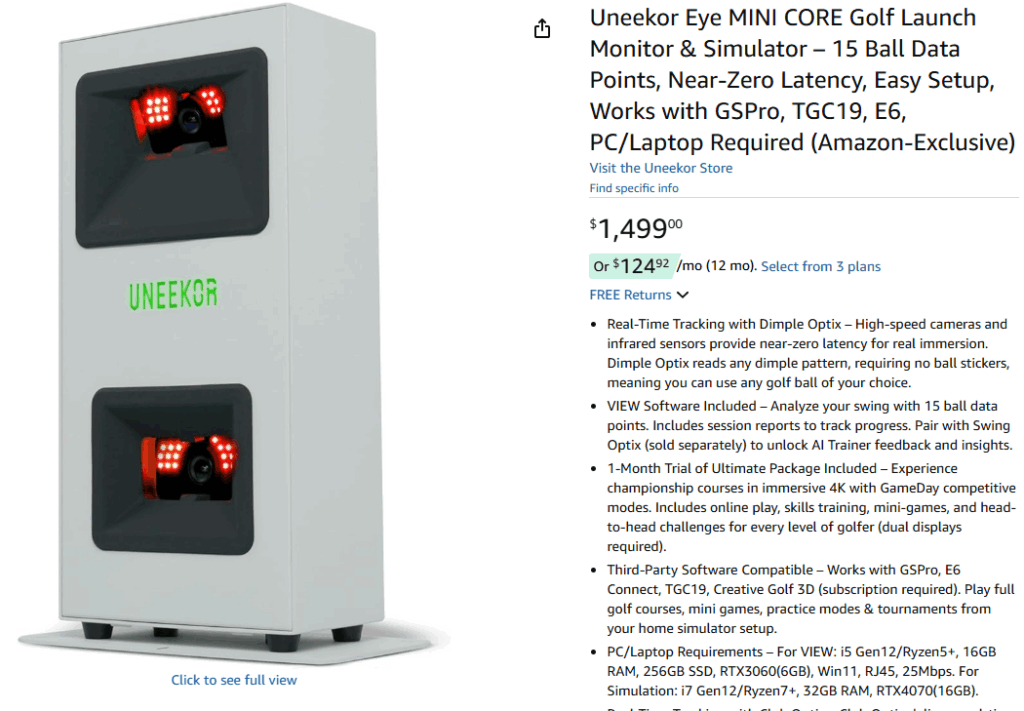
I’m building a $10,000 home golf simulator, and I’ve got about $3,000 budgeted for the launch monitor. After months of research, I’ve narrowed it down to Uneekor—specifically the EYE MINI Core or the EYE MINI Lite. But here’s where it gets interesting: should I buy the Core now and add Swing Optix cameras later, or just go straight for the Lite?
Why I’m Sticking with Uneekor
Before we dive into the comparison, let me explain why I’m committed to Uneekor over other brands in this price range. There are three features that matter to me more than anything else.
First, Uneekor’s slow motion camera technology is unmatched at this price point. The Club Optix system captures club impact at 180 frames per second, giving me crystal-clear video of exactly what’s happening at impact. When I’m trying to fix my hook or figure out why my 7-iron flies inconsistently, being able to see the clubface angle frame-by-frame is invaluable. Most competing launch monitors in this price range either don’t offer impact video at all, or they charge significantly more for the privilege.
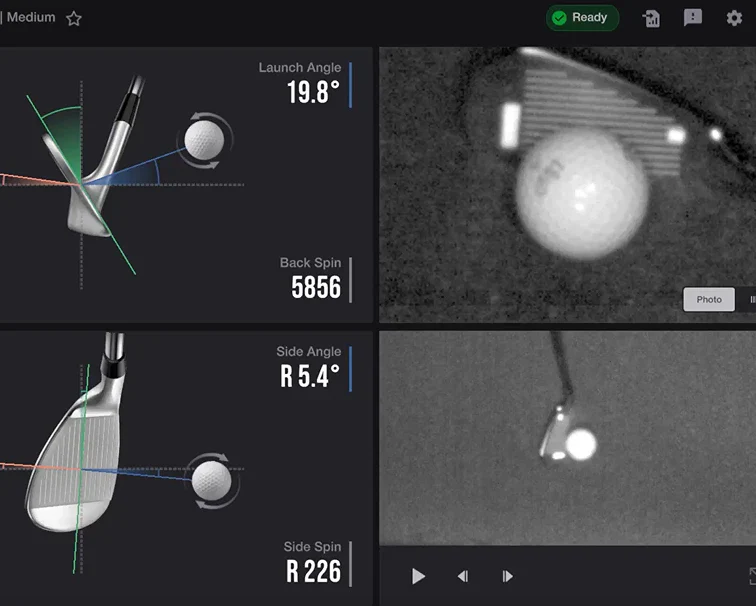
Second, the ability to run a second monitor setup with Uneekor View while playing GSPro is a game-changer for my practice sessions. I can have GSPro running on my main projector for simulation play, and simultaneously have a second monitor showing all my detailed metrics, dispersion patterns, and that club impact video. This dual-screen workflow is exactly what I need for focused practice sessions where I’m working on specific swing changes. Other systems force you to choose between playing and analyzing—Uneekor lets you do both.
Third, and this is crucial for long-term ownership, Uneekor’s subscription model is actually reasonable. The Pro Package costs $199 per year and gives me access to third-party software like GSPro, five Refine courses, and full integration with the VIEW software. Compare that to Bushnell’s LPi requiring $499 annually, or Foresight’s systems at $500+ per year, and suddenly that $199 feels like a bargain. Over five years, I’ll save $1,500 compared to the Bushnell route. That’s real money that can go toward upgrading my projector or adding a better hitting mat down the line.
The Black Friday Factor
Here’s my situation: I’m writing this in November, and I’m hoping the EYE MINI Core might see a price drop during Black Friday sales. At $1,499 currently, even a 10-15% discount would bring it down to $1,275-1,350 range. That would make the decision between Core + Swing Optix versus the Lite much easier on my wallet. The Core is Amazon-exclusive, which means there’s a real possibility of holiday pricing. The Lite, being sold through traditional golf retailers, probably won’t see significant discounting.
So I’m in a bit of a holding pattern. Do I wait and hope for a deal on the Core, knowing I’ll want to add Swing Optix cameras eventually? Or do I just pull the trigger on the Lite and get everything I need in one package? Let me walk you through my analysis, because your situation might mirror mine.
Understanding Your Total Investment
When I say I’m building a $10,000 simulator, here’s roughly how that breaks down. The enclosure runs about $2,000-2,500. A quality 4K projector is another $1,200-1,500. The impact screen and frame cost $800-1,000. A proper hitting mat is $500-800. Gaming PC with an RTX 3060 or better is $1,200-1,500. Then there are the miscellaneous costs—mounting hardware, cables, lighting, maybe some acoustic treatment—that add another $500-800.
That leaves me with about $2,500-3,000 for the launch monitor itself, which is the single most important component of the entire system. Everything else just displays or houses what the launch monitor tells it. Skimping on the launch monitor to save $500 and put it toward a fancier projector would be backwards thinking. The launch monitor is the brains of the operation.
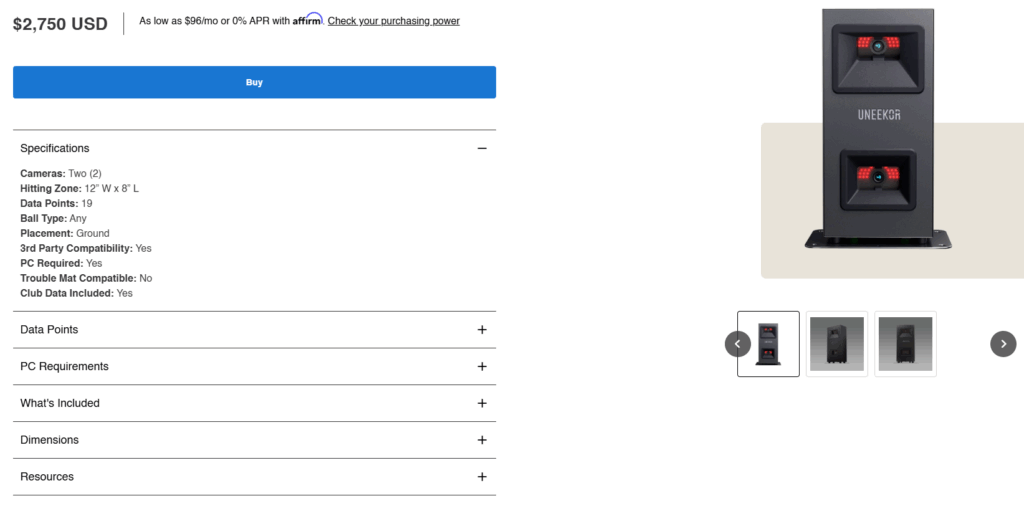
So when I’m comparing the Core + Swing Optix ($2,899) against the Lite ($2,750), that $149 price difference is almost negligible in the context of a $10,000 build. But the capabilities difference? That matters enormously.
The Real Comparison: Core + Swing Optix vs. Lite
Most people compare the Core and Lite as if they’re competing products at different price points. But that’s not the right way to think about it. The Core, by itself at $1,499, is really just a ball-tracking device. Yes, it’s incredibly accurate for ball flight data, but it doesn’t give you any club metrics. No smash factor, no club path, no attack angle, no club speed. For someone building a serious simulator who wants to actually improve their game, that’s a non-starter.
So the real question becomes: should you buy the Core and immediately add Swing Optix cameras for $1,400 (total investment: $2,899), or should you buy the Lite at $2,750 and get club data built-in from day one?
The Swing Optix cameras are remarkable pieces of technology. They capture down-the-line and face-on swing video at 160 frames per second with 1440×1080 resolution. You get interchangeable telephoto and fisheye lenses, drawing tools for swing analysis, side-by-side comparison features, and full integration with Uneekor’s AI Trainer. These cameras transform your simulator from a shot tracker into a complete training studio. For someone serious about game improvement, they’re almost essential.
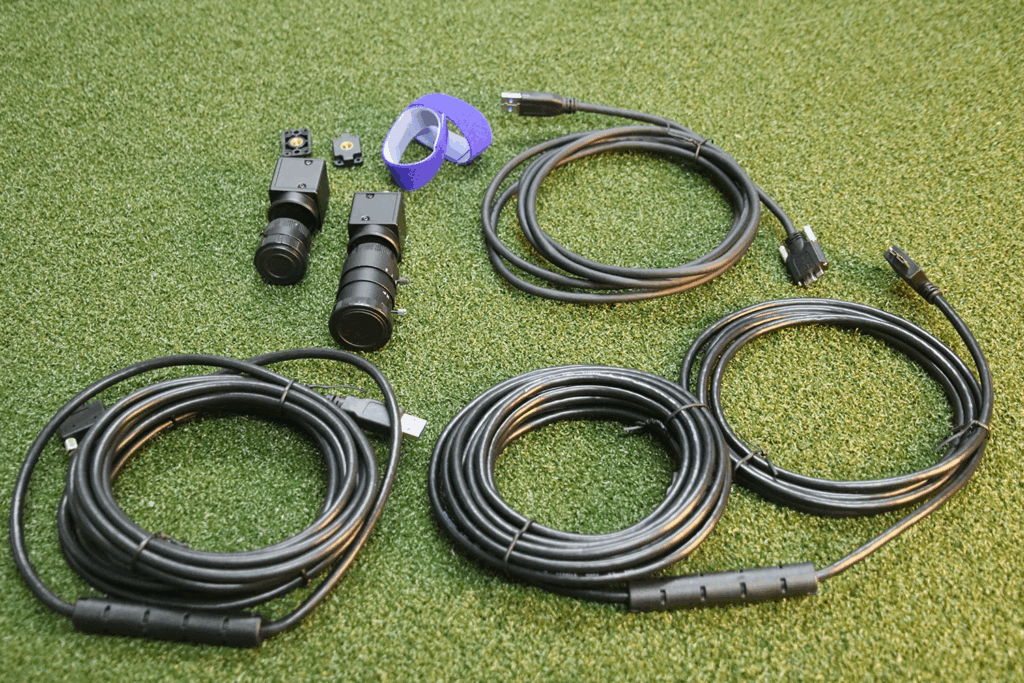
But here’s the critical question: if you’re going to spend $2,899 on Core + Swing Optix, why wouldn’t you spend $149 less ($2,750) for the Lite, which gives you complete club data through its built-in Club Optix technology? The answer isn’t as straightforward as it seems, and it depends on what you value most in your practice sessions.
Why Smash Factor Matters More Than You Think
Let me explain why I keep coming back to smash factor as the defining metric in this decision. Smash factor is the ratio of ball speed to club speed, and it’s the single best indicator of how efficiently you’re transferring energy from club to ball. A driver smash factor of 1.50 is tour-level contact—you’re getting essentially every possible yard out of your swing speed. A smash factor of 1.30 means you’re leaving 20-30 yards on the table due to poor contact.
Here’s why this matters so much in practice: let’s say you hit a drive that carries 260 yards. You feel pretty good about it. But without club speed data, you don’t know if you achieved that distance with a pure strike at 105 mph club speed (1.48 smash factor, excellent) or a toe hit at 115 mph club speed (1.30 smash factor, terrible). Both shots travel the same distance, but one is repeatable and efficient while the other requires you to swing out of your shoes to compensate for poor contact.
When you’re working on swing changes, this distinction becomes even more critical. You make an adjustment based on your coach’s advice or something you saw on YouTube. You hit a few balls. They seem to go about the same distance as before. Did the change work? Without smash factor, you have no idea. Maybe you’re making better contact but swinging slightly slower. Maybe you’re making worse contact but swinging harder. The ball flight alone can’t tell you.
The Core by itself gives you ball speed but not club speed. No club speed means no smash factor calculation. You’re flying blind on the most important metric for understanding contact quality. This is why the Core, in isolation, isn’t a viable option for serious improvement work. You need club data, which means either adding Swing Optix cameras or buying the Lite.
The Complete Metrics Breakdown
| Metric | Core + Swing Optix | EYE MINI Lite |
|---|---|---|
| TOTAL PRICE | $2,899 ($1,499 + $1,400) | $2,750 |
| Price Difference | $149 MORE expensive | $149 LESS expensive |
| Within $3,000 Budget? | ✅ YES | ✅ YES |
| CRITICAL CLUB METRICS | ||
| Smash Factor | ✅ YES (via cameras) | ✅ YES (built-in) |
| Club Speed | ✅ YES (via cameras) | ✅ YES (built-in) |
| Club Path | ✅ YES (via cameras) | ✅ YES (built-in) |
| Attack Angle | ✅ YES (via cameras) | ✅ YES (built-in) |
| Face Angle | ⚠️ Limited | ✅ YES (built-in) |
| BALL DATA | ||
| Ball Speed | ✅ YES | ✅ YES |
| Total Spin | ✅ YES | ✅ YES |
| Back Spin | ✅ YES | ✅ YES |
| Side Spin | ✅ YES | ✅ YES |
| Launch Angle | ✅ YES | ✅ YES |
| Carry Distance | ✅ YES | ✅ YES |
| Total Distance | ✅ YES | ✅ YES |
| Side Angle | ✅ YES | ✅ YES |
| Spin Axis | ✅ YES | ✅ YES |
| Apex Height | ✅ YES | ✅ YES |
| VIDEO & ANALYSIS | ||
| Club Impact Video (180fps) | ❌ NO | ✅ YES |
| Down-the-Line Swing Video | ✅ YES (160fps) | Can add (+$1,400) |
| Face-On Swing Video | ✅ YES (160fps) | Can add (+$1,400) |
| AI Trainer Access | ✅ YES | Can add (+$1,400) |
| Side-by-Side Comparison | ✅ YES | Can add (+$1,400) |
| Drawing Tools | ✅ YES | Can add (+$1,400) |
| Interchangeable Lenses | ✅ YES (telephoto/fisheye) | Can add (+$1,400) |
| SOFTWARE & SETUP | ||
| Works with GSPro | ✅ YES | ✅ YES |
| Third-Party Connector Fee | $199/year | $199/year |
| Dual Monitor Support | ✅ YES | ✅ YES |
| Included Software | View (free) | View (free) |
| Indoor Only | ✅ YES | ✅ YES |
| Requires Gaming PC | ✅ YES | ✅ YES |
| HARDWARE SETUP | ||
| Base Camera System | 2 high-speed cams | 2 high-speed cams |
| Additional Cameras | 2 Swing Optix cameras | Optional upgrade |
| Mounting Required | Yes (cameras on tripods) | No (for base unit) |
| Cable Management | 3 USB cables (cameras) | 1 ethernet cable |
| Requires Club Stickers | YES | YES |
| UPGRADE PATH | ||
| Already maxed out? | ✅ YES | ❌ NO |
| Can add Swing Optix later? | Already included | ✅ YES (+$1,400) |
| Future-Proof Total | $2,899 | $4,150 (if adding Swing Optix) |
What the Table Really Tells Us
The first thing that jumps out is the price. You’re spending $149 more for the Core + Swing Optix combo compared to the Lite alone. That immediately makes you question the value proposition. Why would you pay more for what seems like similar capabilities?
The answer lies in the type of data and feedback each system provides. The Lite gives you club metrics through its built-in Club Optix technology, which captures impact at 180 frames per second. You see the clubface at impact, you get smash factor, club path, and attack angle calculated directly from the high-speed cameras watching the club. This is native, built-in functionality. It just works, every time, with no additional setup required.
The Core + Swing Optix approach is different. The base Core unit tracks ball flight with exceptional accuracy. Then you add two external Swing Optix cameras positioned down-the-line and face-on to capture your entire swing motion. These cameras provide some club data through video analysis, but more importantly, they give you a completely different type of feedback. You’re not just seeing impact—you’re seeing your entire swing sequence from multiple angles in slow motion. You can draw lines on your swing to check positions, compare swings side-by-side, and use the AI Trainer for automated feedback.
Think of it this way: the Lite tells you what happened at impact with precision. The Core + Swing Optix shows you everything that led up to that impact, plus gives you some impact data as a bonus.
For someone like me who’s building a simulator primarily for practice and improvement, the Swing Optix video capabilities are incredibly appealing. Being able to see my swing from down the line immediately after each shot, with the ability to scrub through frame-by-frame and draw check lines for my swing plane or hip rotation, is exactly the kind of feedback that leads to breakthrough improvements. This is the stuff you get from a $200/hour teaching pro with a high-speed camera setup. Having it integrated into my simulator for every single practice session changes everything.
The Real-World Cost Analysis
Let’s get specific about what you’ll actually spend over time with each setup.
Year 1 Total Investment
Core + Swing Optix Setup:
- EYE MINI Core hardware: $1,499
- Swing Optix cameras: $1,400
- Uneekor Pro Package (for GSPro): $199
- GSPro software: $250
- Year 1 Total: $3,348
EYE MINI Lite Setup:
- EYE MINI Lite hardware: $2,750
- Uneekor Pro Package (for GSPro): $199
- GSPro software: $250
- Year 1 Total: $3,199
Right out of the gate, the Lite saves you $149 in Year 1. Both setups are comfortably within a $3,000 launch monitor budget when you factor in the necessary software subscriptions.
Years 2-5: Ongoing Costs
Both setups have identical annual costs once you’re past the initial hardware purchase:
- Uneekor Pro Package: $199/year
- GSPro software: $250/year
- Annual recurring cost: $449/year
Five-Year Total Cost of Ownership
- Core + Swing Optix: $3,348 + ($449 × 4) = $5,144
- EYE MINI Lite: $3,199 + ($449 × 4) = $4,995
Over five years, you’ll save $149 with the Lite. Not a massive difference in the context of a five-figure simulator build, but worth noting that you’re paying more upfront with the Core + Swing Optix setup for a different type of functionality, not superior functionality.
The Impact Video Dilemma
Here’s where things get really interesting, and it’s the part of this comparison that keeps me up at night. The Lite gives you 180 fps club impact video natively. Every single shot, you see exactly what the clubface looked like at impact. For diagnosing contact issues—am I hitting it off the toe, am I delofting the club, is my face angle matching my path—this is invaluable feedback.
The Core + Swing Optix setup does not give you that impact video. The Swing Optix cameras are positioned to capture your full swing motion, not the precise moment of impact. You get down-the-line and face-on views of your swing at 160 fps, which is incredible for checking positions and swing sequence. But you don’t get that zoomed-in, super slow-motion view of the clubface meeting the ball.
This is a crucial distinction. If you’re trying to understand why you’re hitting a push-fade, the Lite’s impact video immediately shows you the face angle and path relationship at impact. You see it right there—face open to target, slightly open to path, explaining both the push start and the fade curve. The Swing Optix cameras would show you your entire swing, allowing you to trace back what in your swing sequence led to that face angle, but they won’t show you the impact itself with the same clarity.
Different golfers value these differently. If you’re the type who wants to understand the “why” behind every miss—tracing issues back through your entire kinematic sequence—the Swing Optix approach is brilliant. If you’re more focused on the result and making quick adjustments based on impact conditions, the Lite’s approach is more direct and actionable.
I find myself pulled in both directions. The instructor in me wants the full swing video to understand movement patterns and positions. The player in me wants to see impact and make immediate adjustments. This is why the Lite’s upgrade path is so appealing—you can start with impact video and precision club data, then add the Swing Optix cameras later when you’re ready to dive deeper into swing mechanics.
The Setup and Usability Factor
There’s a practical consideration that doesn’t show up in the spec sheets but matters enormously in daily use: setup complexity. The Lite is plug-and-play. You connect it to your PC via ethernet, place it in position, and you’re tracking shots. One device, one cable (plus power), minimal fuss.
The Core + Swing Optix setup requires more thought. You’ve got the base Core unit in its standard position. Then you need to mount two Swing Optix cameras—one down-the-line (typically behind you and slightly to the side), one face-on (perpendicular to your target line). Each camera needs a USB 3.0 connection to your PC. You need tripods or wall mounts for stable camera positioning. You need to ensure proper lighting so the cameras can track your swing effectively.
Is this a dealbreaker? Absolutely not. Plenty of golfers successfully run multi-camera setups. But it’s more complexity, more cables, more things that can potentially go wrong or need adjustment. If you’re someone who wants to walk into your simulator room and start hitting balls without thinking about equipment, the Lite’s simplicity is appealing.
On the flip side, that setup complexity comes with flexibility. With the Swing Optix cameras on tripods, you can adjust angles based on what you’re working on. Want a different perspective on your backswing? Move a camera. Want to capture your follow-through more clearly? Adjust the positioning. The Lite’s cameras are fixed in the device itself—they capture what they capture, which is fantastic for impact but non-negotiable in terms of viewing angles.
My Decision-Making Framework
After all this analysis, here’s how I’m thinking about the decision for my own build.
If I buy the Core + Swing Optix setup, I’m betting that full-swing video analysis will be my primary practice tool. I’m prioritizing the ability to see my swing from multiple angles, use the AI Trainer for automated feedback, and compare swings side-by-side when working on changes. I’m accepting that I won’t have that super high-resolution impact video, but I’ll still get basic club data and can infer a lot from the ball flight combined with swing video.
This approach makes sense if I’m planning to do a lot of technical swing work. If I’m rebuilding my swing, working with an online coach who wants video, or really focused on ingraining new movement patterns, the comprehensive swing video is more valuable than impact video alone.
If I buy the EYE MINI Lite, I’m prioritizing precision club data and impact feedback. I’m saying that understanding what’s happening at impact—face angle, path, strike location—is more immediately actionable for me than seeing my entire swing sequence. I can make adjustments based on those numbers and that impact video, and I’ll improve through better understanding of cause and effect at impact.
This approach makes sense if I’m working on consistency more than major swing changes. If my swing is reasonably sound and I’m focused on dialing in distances, improving strike quality, and making small adjustments for better ball flight, the Lite gives me everything I need immediately. And crucially, I can always add Swing Optix later if I decide I want that full swing video capability.

The “Add Later” Strategy
This brings up an important consideration: the upgrade path. The Lite can add Swing Optix cameras later for $1,400, bringing the total investment to $4,150. The Core already includes Swing Optix in our comparison, so there’s no upgrade path—you’re fully featured from day one.
For someone on a tight budget who wants to spread costs over time, starting with the Lite at $2,750 and adding Swing Optix 6-12 months later when budget allows is a legitimate strategy. You get immediate game-improvement functionality, and you add the comprehensive swing video when you’re ready to dive deeper into mechanics.
Starting with the Core alone at $1,499 is tempting from a budget perspective, but I genuinely don’t think it makes sense for someone serious about improvement. You’re spending $1,500 on a device that only gives you ball flight data. For casual simulator play, that’s fine. For practice and improvement, you’re missing too much critical information. You’d be better off saving for another month or two and getting the Lite.
The Software Ecosystem Advantage
One aspect I haven’t fully explored yet is how both setups integrate with Uneekor’s software ecosystem, because this is where Uneekor really shines compared to competitors.
The free VIEW software is legitimately good—not just “free so we’ll overlook its limitations” good, but actually useful for practice. You get a 3D driving range with realistic graphics, full shot tracking with dispersion patterns, the ability to set up practice scenarios, and integration with that second monitor setup I mentioned earlier. Whether you have the Core + Swing Optix or the Lite, VIEW gives you a solid practice environment without spending anything beyond the hardware.
If you upgrade to the Pro Package ($199/year), you unlock third-party software integration plus five Refine courses. The third-party integration is essential if you want to use GSPro, which frankly has much better course graphics and a more active online community than Uneekor’s own simulation software. GSPro costs another $250/year, but it’s widely considered the best value in golf simulation software. The combination of Uneekor hardware with GSPro software is what most serious home simulator builders end up with.
The Champion Package ($349/year) adds 15 more Refine courses for a total of 20. These are Korean courses with decent graphics but nothing spectacular. If you’re primarily playing GSPro, the Champion Package probably isn’t worth it unless you really want those extra practice modes in Refine.
The Ultimate Package ($599/year) adds GameDay, Uneekor’s new 4K simulation software with premium U.S. courses. Early reviews suggest GameDay is a significant step up from Refine in terms of graphics and gameplay. If it continues to improve, the Ultimate Package might become the go-to option for people who want everything in one ecosystem without adding GSPro.
The point is: both the Core + Swing Optix and the Lite give you access to this entire software stack. Your choice of hardware doesn’t limit your software options. That $199/year Pro Package fee is identical for both setups, and it’s what unlocks the full potential of either system.
Making Your Decision
After writing all of this, I’ve essentially talked myself into a decision, and I think it’ll be the right choice for most people in my situation.
Buy the EYE MINI Lite.
Here’s why: for $149 less than Core + Swing Optix, you get native club data that’s more accurate and more comprehensive than what the Swing Optix cameras provide. You get that incredible 180fps impact video that immediately shows you what’s happening at contact. You get simpler setup with one device and one cable. And critically, you maintain a complete upgrade path to add Swing Optix later if and when you decide you want full-swing video analysis.
The Core + Swing Optix setup is excellent, don’t get me wrong. If you already know you want comprehensive swing video as your primary practice tool, it delivers that beautifully. But for most golfers building a home simulator, the Lite’s approach of precision impact data first, with the option to add swing video later, is the smarter path.
You start with the most actionable feedback—what’s happening at impact—and you build from there. If six months in, you find yourself wishing you could see your entire swing sequence, you add the Swing Optix cameras. If you’re satisfied with the impact video and club data, you’ve saved that $1,400 and can put it toward other simulator upgrades or golf equipment.
The Black Friday Wildcard
Now, that said, if the Core drops to $1,200-1,300 on Black Friday, the math changes significantly. Core ($1,275) + Swing Optix ($1,400) = $2,675, which is $75 less than the Lite. At that point, the value proposition of getting full swing video capability for less money becomes genuinely compelling.
So my plan is this: watch the Core’s price closely during Black Friday and Cyber Monday. If it drops by 15% or more, I’ll strongly consider the Core + Swing Optix route, accepting that I’m trading impact video for swing video but saving money in the process. If it stays at full price or only drops slightly, I’m buying the Lite without hesitation.
For you reading this after the holiday sales period, apply the same logic: if you can get the Core at a significant discount, the Core + Swing Optix combo becomes more attractive. At full price, the Lite is the better value.
The Bottom Line
Both setups will give you an exceptional home simulator experience. Both will help you improve. Both integrate beautifully with Uneekor’s software and support that dual-monitor workflow that’s so valuable for practice.
The EYE MINI Lite is the safer, more straightforward choice. You get everything you need immediately, with the best club data in this price range and impact video that directly aids improvement. The simpler setup means less friction when you want to practice.
The Core + Swing Optix setup is the choice for golfers who prioritize full-swing video analysis and are willing to accept more complex setup and the lack of impact video in exchange for comprehensive swing footage and AI-powered feedback.
For most people building a $10,000 home simulator with about $3,000 allocated to the launch monitor, I recommend the Lite. Start there, master the fundamentals of using club data and impact video for improvement, and add Swing Optix later if your practice needs evolve to require full swing analysis.
Just watch those Black Friday prices—you might find the decision made for you by a good sale.
Footnote on the Bushnell LPi: The Bushnell LPi is worth a brief mention at its $1,500 price point (as of Nov 2025). It provides ball-only data similar to the base Core, using Foresight’s excellent 3-camera Doppler radar technology. However, to access club data and use it with simulator software like GSPro, you need Bushnell’s Gold subscription at $499/year—significantly more expensive than Uneekor’s $199/year Pro package. Over five years, that’s $1,500 more in subscriptions. The LPi is also region-locked to the USA only. While the hardware is excellent and slightly more accurate than camera-based systems, the subscription costs and regional limitations make it less appealing than either Uneekor option for most international buyers or budget-conscious golfers planning long-term ownership.

David is an avid golfer who loves walking Connecticut’s courses and playing alongside his family. He’s passionate about golf course architecture and one day hopes to play at Pebble Beach.





What did you end up buying?